
What is an ATS (applicant tracking system)?Features, when you need one and how to choose one in Japan
This guide explains what an ATS (applicant tracking system) is and does, its pros and cons, when a company needs one and how to choose one. Get the selection checklist and save it as Excel or PDF.


Basics
What is an ATS: one system for every applicant and every stage of selection
Key points
An ATS (applicant tracking system) is software that manages everything from posting jobs to receiving applications, tracking where each candidate is in selection, contacting applicants and recording interview evaluations, all in one place. It is also called an applicant management system or a recruitment management system, and it is the core of most recruiting software. Because it holds job seekers' personal information, the same rules apply whichever product you choose: state the purpose of use, limit who can see the data, and delete data you no longer need.
As a recruiter, I have used many different ATSs: a Salesforce-based system at a large Japanese recruitment agency, Workday at Groupon Japan, and a proprietary system at Google.
They varied in ease of use, depth of features and user experience, but every one of them beat a spreadsheet for tracking candidates. The main wins are searching and filtering candidate data, storing resume files and working with hiring managers, all in one system.
For a small business that hires rarely, a spreadsheet can cover the tracking. But if you are hiring consistently, even a simple ATS is worth the investment.
Without an ATS, applications arrive scattered across job site dashboards, Hello Work, employee referrals and email. The person in charge copies them into Excel, emails back and forth to set interview times, and each interviewer keeps their own notes. An ATS gathers all of this into one record per applicant and logs who did what, and when.
Recruitment management system, applicant management system and applicant tracking tool are all names for the same thing. “Recruiting software” is wider: it also covers sourcing, candidate relationship and assessment tools. Some products also post jobs and build careers pages, while others focus on managing applicants.
How an ATS differs from HR and payroll systems and talent management systems
An ATS handles applicants before they join, while HR and payroll systems and talent management systems handle employees after they join. That line changes which laws apply and how long data is kept.
| Item | ATS (applicant tracking system) | HR and payroll system | Talent management |
|---|---|---|---|
| Covers | Applicants | Employees | Employees |
| Main data | Applications, selection records, evaluations | Worker roster, payroll, social insurance | Evaluations, skills, assignments |
| Retention | Delete once no longer needed | 5 years (3 years for the time being) | Set by internal rules |
| Main laws | Employment Security Act, APPI | Labor Standards Act, APPI | APPI |
Source: Labor Standards Act, Articles 107, 109 and 143; Act on the Protection of Personal Information (APPI), Article 22
Once someone is hired, their information moves to the worker roster. The Labor Standards Act requires employers to prepare a worker roster (Article 107) and to keep it for 5 years (Article 109; 3 years for the time being under Article 143). For applicants you did not hire, the APPI asks you to make efforts to delete their data without delay once you no longer need it (Article 22). Products that connect the ATS to an HR and payroll system can pass a new hire's data straight into the onboarding paperwork.
Features
What an ATS does: 8 features from job posting to job offer
The core of an ATS is an applicant database plus a view of where each candidate is in selection. Most products add the steps around it, from job posting and interview scheduling to messaging, evaluation and reporting, on one screen.
| Feature | What the ATS does | Without an ATS |
|---|---|---|
| Job posting | Posts to job sites and your careers page, and closes them all at once | Posted and closed on each job site one by one |
| Application import | Imports applications from job sites automatically and merges duplicates | Copied from each dashboard into Excel |
| Selection tracking | Shows each applicant's stage and next step | Spreadsheet columns edited by hand |
| Interview scheduling | Sends time slots and puts the chosen one in the calendar | Dates emailed back and forth |
| Messaging | Sends invitations and results from templates and keeps the history | Sent from each recruiter's own email |
| Evaluation | Interviewers fill in scorecards that can be compared side by side | Paper and notes stay with each interviewer |
| Offer management | Keeps all contact from offer to start date together | Documents and messages kept separately |
| Reporting | Counts applications, pass rates and days by channel | Counted by hand at month end |
The biggest difference from a spreadsheet is application import and selection tracking. Applications land in the same list wherever they come from, and everyone can see which stage each one is stuck at. The reporting numbers are the basis for reviewing your time to hire and cost per hire.
Message templates can hold the text of your rejection letters and job offer letters. Put the questions and scoring criteria you set before interviews into the scorecard, and differences between interviewers shrink.
Automatic screening and AI: the company sets the criteria
Some ATSs can automatically screen out applicants who miss required criteria, or use AI to score resumes. In a study by Harvard Business School and Accenture (over 2,250 executives and over 8,000 workers in the US, UK and Germany, 2019 to 2020), more than 90% of companies used such systems to filter and rank candidates. About 9 in 10 executives said qualified candidates were screened out because they did not exactly match the job's criteria. The study did not cover companies in Japan, where no official statistics give the share.
In Japan, the Ministry of Health, Labour and Welfare (MHLW) asks employers to base selection on criteria tied to each applicant's aptitude and ability (MHLW guide to fair hiring). If you use automatic screening, check that each filter is based on an ability the job really needs before you set it.
Whether to use an ATS's automatic filters or AI screening depends, in my view, on whether your company is a “buyer” or a “seller”.
If you are hiring for a well-known company, you are a “buyer”. You receive a huge number of applications, and your job is to filter them so the workload stays manageable. Then it makes sense to use automatic filters, even at the risk of losing a few qualified candidates.
If you are a smaller company, don't. You are a “seller”: your role is to pitch the opportunity to as many candidates as possible, while being flexible on your requirements. You do not want to rule out any potential candidate. Review every application yourself.
Pros and cons
ATS pros and cons: faster replies, at the cost of fees and data entry
The pros of an ATS are that you reply to applicants faster and selection records stay in one place. The cons are the monthly fee, the setup work, and the fact that it only works if interviewers enter their evaluations.
ATS pros and cons
What to weigh before an SMB decides
Pros
Speed and records
- Reply to applicants faster
- Fewer missed messages and duplicate records
- Evaluations and selection history are kept
- Numbers by channel
Cons
Cost and effort
- Monthly fees
- Setup and data migration take time
- Doesn't work unless interviewers enter data
- Cancelling means moving your data
- Exposed to vendor incidents
Applicants don't wait long for a reply. In an AIDEM survey (August 2021, 427 people who applied through job sites), 60.7% said they would wait “3 days at most” for a company's first contact. Of the respondents, 54.1% were looking for part-time work. An ATS alerts the person in charge when an application arrives and lets them reply from a template, which makes it easier to respond within 3 days.
The other pros come from keeping records in one place. With one record per applicant, duplicate messages and missed replies drop. Interviewers' evaluations sit side by side, so they are easier to compare. And with applications and pass rates by channel, you can decide to stop job ads that don't work.
Most cons show up when you start and when you stop. Setting up selection stages and scorecards and moving current applicants takes time. Once it is running, if interviewers don't enter their evaluations, the evaluations stay scattered across email and notes. If you can't export your data when you cancel, you can't move to the next system.
Because the data sits with a cloud vendor, you are also exposed to incidents on the vendor's side. In June 2023, a cloud HR and payroll service for certified social insurance and labor consultants suffered unauthorized access, and the Personal Information Protection Commission (PPC) received 3,067 breach reports (covering 7,496,080 people) from the service's users and others. What a company should check is covered in the personal data rules below.
When you need one
Which companies need an ATS: parallel hiring and the people involved matter more than size
Whether your company should adopt an ATS depends less on headcount than on how many roles you are hiring for at the same time and how many people take part in selection. In small companies, most hires come from outside job sites, and few people are hired each year.
In the MHLW's 2025 Survey on Employment Trends, of the people who joined companies with 5 to 29 employees in 2025, 37.1% came through personal connections (acquaintances, friends and so on) and 18.4% through Hello Work, against 23.5% through job ads. Across all companies, job ads account for 32.3% and connections for 21.4% (calculated from the headcounts in the statistical tables).
How people found their job (2025)
MHLW, 2025 Survey on Employment Trends
Share of people hired. Hello Work includes its online service.
Applications through connections tend to arrive by phone or through employee referrals, and Hello Work applicants come with an introduction from the Hello Work office or through its online service. An ATS may not import them automatically the way it imports job site applications. When a small company compares ATSs, it should first look at how easy manual entry is, rather than how many job sites connect.
Look at how many people you hire, too. At the same survey's hiring rate of 14.7%, a 30-employee company takes on about 4 people a year. The often-quoted threshold of “20 or more hires a year” comes with no supporting evidence. Use these 5 signals to decide.
Roles open at the same time
With several roles open, applicants and roles get mixed up more easily.
1toSeveral
How often applications arrive
The more applications, the more manual work replying and scheduling.
MonthlytoWeekly
People involved in selection
The more people, the more you need shared evaluations and access rights.
1 persontoSeveral
Channels applications come from
Each channel has its own screen, and merging them takes more effort.
1toSeveral
Batch graduate hiring
Hiring a cohort at once crowds info sessions and interviews into a short period.
NotoYes
The more on the right, the better an ATS fits
If all are on the left, a spreadsheet can do the job.
As a rule of thumb, if you have more than 3 roles open at once, or open more than 10 roles a year, I think an ATS is worth the investment. And if you keep hiring for a role you fill again and again, such as sales representative, use the ATS to build a long-term candidate pool you can reactivate later.
There are also free ways to manage applicants. Hello Work's employer My Page has an applicant management screen where you can record selection results for applicants who came through Hello Work (Miyagi Labour Bureau guide). Job sites also have screens to manage applicants to the jobs you post there. But each shows only its own channel's applicants, so as channels multiply you need to bring them together in one sheet or an ATS.
If you start with a spreadsheet, create columns for channel, selection stage, next action and owner, and keep one row per candidate. It lets you try the same approach as an ATS at no cost.
Personal data and the law
An ATS holds job seekers' personal data: 7 rules to set before you start
The applications and evaluations in an ATS are job seekers' personal information. The rules of the Employment Security Act and the APPI are the same whether you use a spreadsheet or an ATS, and adopting an ATS is a chance to review how you handle the data.
The path applicant data takes, and 7 rules
What to observe at each stage, from collection to deletion.

EntryCollect
State the purpose specificallySay so if the data is stored in the cloudEmployment Security Act, Art. 5-5
Ask nothing unrelated to aptitude and abilityRegistered domicile, family members' jobs, beliefsEmployment Security Act guidelines
Inside the ATSStore
Limit who can see itOnly people involved in selectionEmployment Security Act guidelines
Supervise the vendorIf it handles the data, that is entrustmentAPPI, Art. 25

ExitDelete
Delete it once it is no longer neededKeeping it for other roles needs consentAPPI, Art. 22
Job adsTake ads down when hiring endsAsk job media to update theirs tooEmployment Security Act, Art. 5-4
If something goes wrongReport data breachesTo the PPC and the people affected. Over 1,000 people, unauthorized access and moreAPPI, Art. 26
When you accept applications, state the purpose of use specifically. The MHLW asks for a purpose specific enough for applicants to picture how their data will be used, and says that “Used for recruitment” alone is not enough. Its example is wording such as “Used to contact you about interview dates”, and if you ask a third party to store the data, you must say so too (recruitment handling guidelines, June 2025). If you keep applicant data in a cloud ATS, stating that as well is the safe choice.
When you collect the data directly from the person through an application form, state the purpose in advance (APPI, Article 21(2)). The Employment Security Act's duty to make the purpose clear when collecting job seekers' personal information was added by the amended Employment Security Act in force from October 1, 2022.
Application forms must not include fields unrelated to aptitude and ability. The Employment Security Act guidelines in principle ban collecting race, ethnicity, social status, family origin, registered domicile, birthplace and other matters that may cause social discrimination, as well as beliefs and labor union membership. The handling guidelines add examples such as family members' jobs and income, the political party a person supports and their favorite books. And the MHLW asks companies that build their own application questionnaires or online application forms not to include matters unrelated to aptitude and ability (MHLW guide to fair hiring).
Check the default fields on the ATS's application form as well. The benchmark is the MHLW's model resume form (April 2021), which makes gender optional and has no fields for spouse, number of dependents, duty to support a spouse or commuting time. Sensitive personal information such as medical history can't be collected without the person's consent (APPI, Article 20(2)).
Limit who can see the data inside the company, too. The guidelines require measures that stop people without proper authority from seeing personal information, and you must explain those measures if an applicant asks. Showing interviewers only the applicants for their own roles is one such measure.
Don't keep data longer than needed. Make efforts to delete personal data without delay once it is no longer needed (APPI, Article 22). The guidelines also require measures to dispose of or delete personal information you no longer need to keep, and a request from the person to delete their data is covered by these measures too. If you want to keep a rejected applicant for other roles, state that purpose and get their consent. On the other hand, keep records of the working conditions you showed applicants until that recruitment ends (handling guidelines).
Job information must be kept accurate and up to date (Employment Security Act, Article 5-4). When you close a role or change its details, promptly take the ad down or correct it, and ask the job media that carry it to update it too (handling guidelines). An ATS connected to job sites lets you do this in one place. Our guide on how to write a job posting covers what to include.
Set the procedure for a data breach in advance as well. Some breaches must be reported: for example when sensitive personal information is involved, when an unlawful purpose such as unauthorized access may be behind it, or when more than 1,000 people are affected. Report these to the PPC promptly, file a full report within 30 days (60 days when an unlawful purpose is involved), and notify the people affected (APPI, Article 26; Enforcement Rules, Articles 7 and 8). Even when it happens in a cloud service where the vendor does not handle the data, the reporting duty sits with the company using it (guidelines Q&A 6-22). In fiscal 2025, the PPC processed 17,139 breach reports from private businesses and others (FY2025 annual report).
Cloud ATSs and entrustment: if the vendor handles the data, you must supervise it
Whether using a cloud ATS counts as entrusting personal data depends on whether the vendor handles the personal data stored with it (PPC guidelines Q&A 7-53). If the contract says the vendor won't handle it and access is properly controlled, it is not entrustment, but the company must still take its own security measures (7-54).
If it is entrustment, the company must supervise the vendor (APPI, Article 25). The PPC's guidelines require three things: choosing the vendor carefully, signing an entrustment contract and keeping track of how the vendor handles the data.
This line has been tested in a real case. In March 2024, the PPC found that the cloud HR and payroll service mentioned above had been handling personal data under entrustment, partly because its maintenance IDs could access users' data. It said many users had little awareness that they were entrusting data, and that their supervision of the vendor may have been insufficient (Personal Information Protection Commission).
The APPI amendment promulgated on July 17, 2026 also revises the duties of entrusted vendors. One reason given is cases where vendors used personal data beyond the entrusted work. It takes effect within 2 years of promulgation (Personal Information Protection Commission).
Using an ATS based outside Japan
If a vendor outside Japan handles the personal data, that counts as providing data to a third party in a foreign country, and in principle you need the applicant's consent (APPI, Article 28). The exceptions are businesses in the EU and the UK, and businesses with systems in place to keep taking measures equivalent to those required under Japanese law. Even when the vendor does not handle the data, applicants must be able to find out the countries where the vendor and the servers are, and the measures you took after checking those countries' rules (Q&A 10-25).
How to choose
How to choose an ATS: 6 steps to check before you sign
Choose an ATS by how well it fits the way your applications arrive and the way it handles personal data, not by the number of features. Comparing products with these 6 steps keeps you from discovering missing features after you sign.
-

Write down how you hire now
Write down the roles you are hiring for at once, monthly applications, the channels applications come from and the people involved in selection. If your hiring flow isn't set yet, design your hiring process first.
-
Decide which features you need
Sort features into must-haves and nice-to-haves based on whom you hire (new graduates, mid-career or part-time staff), whether the ATS connects to the job sites you use, and how easily you can enter Hello Work and referral applications by hand.
-

Check data handling in the contract
Check in the contract and terms of use whether the vendor handles the data (support staff viewing it, for example), the countries of the vendor and the servers, whether the vendor uses applicant data for its own purposes, and whether you can export all data when you cancel (personal data rules).
-
Test it with real applications
If there is a free trial, run one real role through it, from importing applications to scheduling and entering evaluations. Have interviewers enter data too.
-
Set it up, then move the data
Decide the selection stages, scorecards, access rights, retention and deletion rules and application form fields, then move your current applicant data.
-

Set the working rules
Decide the deadline for entering selection results, a target time to reply to applicants and the numbers to check each month, and tell everyone involved in selection.
Everyone sees the same record
With every applicant's record in one place, delays in selection and missed messages show up right away.
ATS costs and subsidies
Pricing works differently for each product. Check whether there is a setup fee and whether the monthly fee depends on the number of roles, users or applications, get quotes on the same terms, and compare the total for one year.
Small and medium-sized businesses may be able to use the Digitalization and AI Adoption Subsidy (formerly the IT Introduction Subsidy). The standard track covers up to 1/2 of the cost (up to 2/3 if conditions are met), with a subsidy of ¥50,000 to under ¥1.5 million (for 1 or more business processes). Eligible business processes include “general affairs, HR, payroll, training, legal, IT systems and integrated operations”. Cloud fees are covered for up to 2 years.
Only products registered as IT tools are eligible. You apply together with a registered IT support provider. The 7th application deadline for the 2026 standard track is December 1.
ATS selection checklist
Check these in order before you sign. The Excel version adds a table comparing up to 3 candidate ATSs with Yes, Partly or No marks, and a one-year cost calculation.
ATS (applicant tracking system)
ATS selection checklist
0 / 10 done
Checks based on Articles 5-4 and 5-5 of the Employment Security Act and its guidelines, Articles 22, 25 and 28 of the APPI, and the PPC's guidelines Q&A.
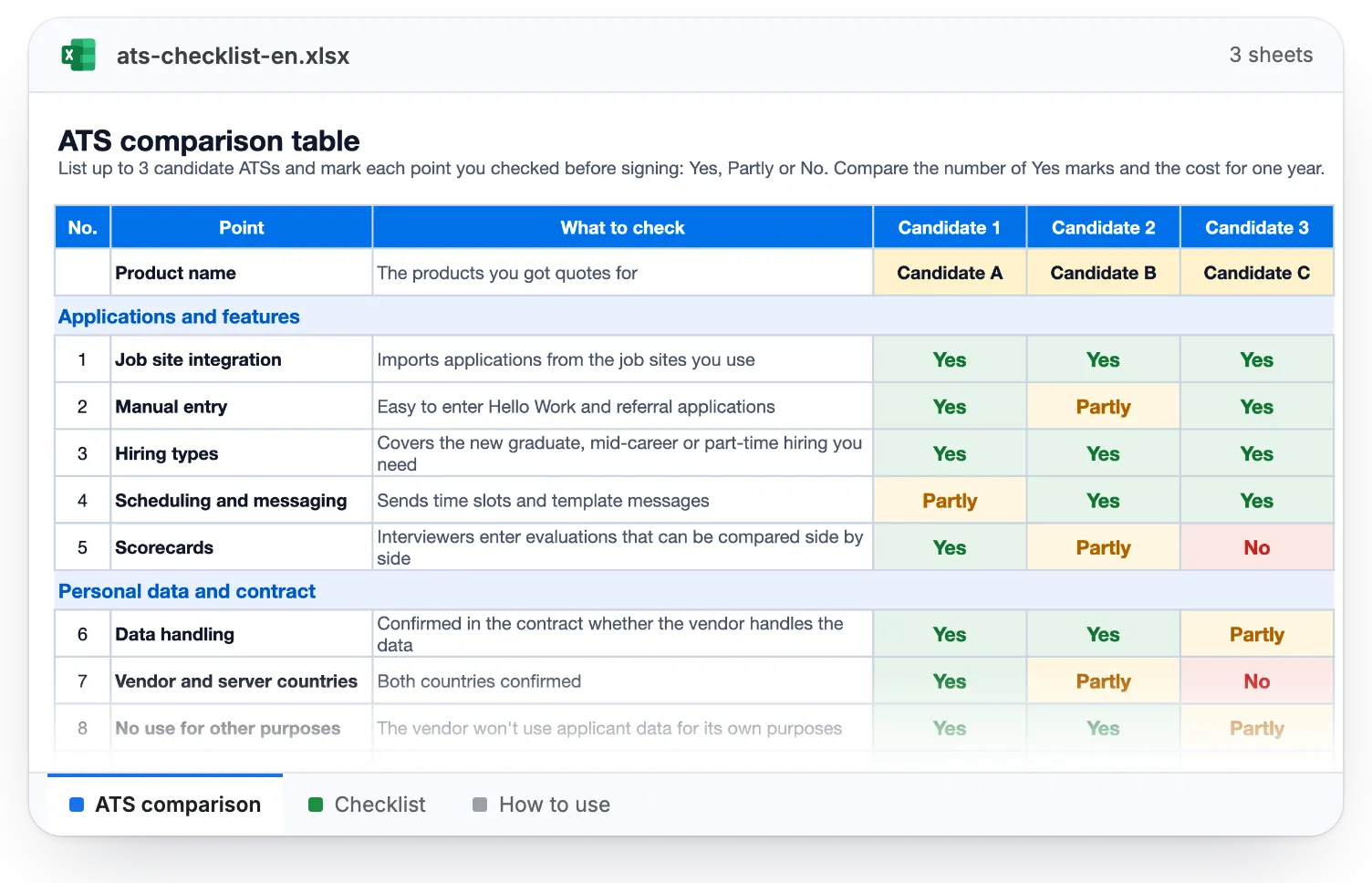
- The Excel file has 3 sheets (comparison, checklist, how to use); the PDF keeps the boxes you ticked.
- We use your email for this download; tips are sent only if you opt in.
FAQ
Frequently asked questions about ATS (applicant tracking systems)
What does ATS stand for?
ATS stands for applicant tracking system: a system that tracks applicants. In Japan, HR teams usually use a Japanese term that translates as “recruitment management system”. It has nothing to do with ATS in rail safety (Automatic Train Stop).
Is an ATS the same as recruiting software?
Mostly. An ATS is the core of most recruiting software, and the two terms are often used interchangeably, but recruiting software can also mean sourcing or assessment tools. Recruitment management system and applicant management system are other names for an ATS.
Is there a free ATS?
Some products have a free plan, and job sites also have screens to manage applicants to the jobs you post there. Applicants from Hello Work can be managed in the applicant management screen of its employer My Page. Free or not, the same rules apply, such as stating the purpose of use and deleting data.
Can we manage applicants in Excel or a spreadsheet?
No rule says which tool to use. But the same rules as for an ATS apply: limit who can open the file, don't pass it around as an email attachment, and delete the rows of applicants you no longer need.
How much does an ATS cost?
Pricing works differently for each product, so compare quotes on the same terms. Check whether there is a setup fee and whether the monthly fee depends on the number of roles, users or applications, and compare the total for one year.
Can we use a subsidy to adopt an ATS?
An ATS registered as an IT tool can qualify for the Digitalization and AI Adoption Subsidy. The standard track covers up to 1/2 of the cost, with a subsidy of ¥50,000 to under ¥1.5 million (for 1 or more business processes), and cloud fees are covered for up to 2 years.
How long should we keep applicant data, and when should we delete it?
Make efforts to delete it without delay once you no longer need it. Keep records of the working conditions you showed applicants until that recruitment ends. Information on people you hire goes into the worker roster, which is kept for 5 years (3 years for the time being).
Can we use an ATS based outside Japan?
Yes, but there is more to check. If the vendor handles personal data, you need applicants' consent, except for businesses in the EU and the UK or businesses with systems equivalent to Japanese standards. Even if it doesn't, applicants must be able to find out the countries of the vendor and the servers.
Can we use an ATS's AI to screen applications?
Yes, but the company sets the criteria and checks the results. The MHLW asks employers to base selection on criteria tied to each applicant's aptitude and ability. Applicants screened out automatically can include people who could do the job, so a small company with few applicants is better off reviewing every application itself.
DIY Hiring Kit
Everything You Need To Hire On Your Own
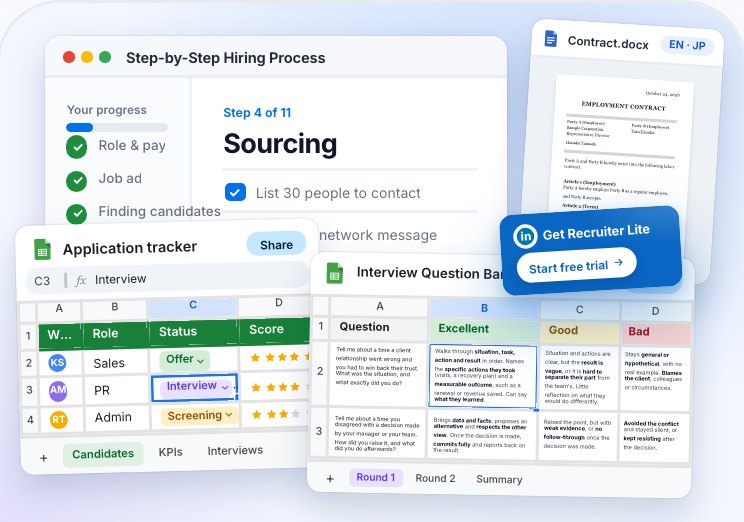
A downloadable hiring framework for small businesses in Japan, with step-by-step guides, spreadsheet ATS, LinkedIn scouting system, interview questions bank, offer letter and employment contracts, and a ton more!
1Dashboard11Checklists8Spreadsheets30Template docs4Weeks of Q&ABilingual
- Download every file as Word, Google Docs, Excel or Google Sheets


 14 years in talent acquisition
Related content
Related guides and tools
 Guide
How to design a hiring process for SMBs
Set your flow from sourcing to interviews before you load it into an ATS.
 Guide
Interview questions
Questions to put in the scorecard, and how to score on the same criteria.
 Tool
Time to hire calculator
Use the dates in your ATS to find the stage where selection stalls.
 Tool
Cost per Hire: Averages and Calculator
Work out your cost per hire, including ATS fees.
 Guide
Company careers site in Japan (pros and cons)
The purpose of use and fields on your application form, and the rules for posting and updating jobs.
 Basics
What is referral hiring in Japan?
The most common way into small companies, and how to handle referred applicants.
Official sources
The main sources for this guide, most of them in Japanese. Other statistics and documents are linked where they appear in the text.
- MHLWwww.mhlw.go.jp Recruitment handling guidelines (June 2025) How to state the purpose of use, information you must not collect, and keeping job information current.
- e-Gov law searchlaws.e-gov.go.jp Employment Security Act Accurate job information (Article 5-4) and job seekers' personal information (Article 5-5).
- e-Gov law searchlaws.e-gov.go.jp Act on the Protection of Personal Information Deletion (Article 22), supervising vendors (Article 25), breach reports (Article 26) and transfers abroad (Article 28).
- Personal Information Protection Commissionwww.ppc.go.jp Guidelines Q&A Cloud services and entrustment (7-53, 7-54), servers abroad (10-25) and breach reports (6-22).
- Personal Information Protection Commissionwww.ppc.go.jp Administrative action against a cloud provider (March 25, 2024) The case in which a cloud HR and payroll provider was found to be an entrusted vendor.
- MHLWwww.mhlw.go.jp 2025 Survey on Employment Trends How people found their job by company size (Table 16), and the hiring rate.
Important. This page is general information based on laws and published data as of November 5, 2026, not legal advice. Survey figures apply to each survey's sample and date. We calculated the shares in the “How people found their job” chart from the headcounts in the MHLW's statistical tables.